.png)
The 2025 Keyword Research Playbook
The 2025 Keyword Research Playbook
A practical, fast workflow to win topical authority and measurable ROI
Main keyword: The 2025 Keyword Research Playbook
Related keywords: keyword research, topical authority, keyword clustering, search intent, long-tail keywords, keyword difficulty, traffic potential, People Also Ask, featured snippets, internal linking, content decay, E-E-A-T.
What Changed—and Why This Playbook Matters
Search is busier and noisier than ever. AI overviews, richer SERP features, and zero-click answers mean a single post rarely wins alone. In 2025, the winners earn topical authority across clusters of related pages, aligned to search intent and supported by helpful utilities like calculators, templates, and FAQs.
The 2025 Keyword Research Playbook gives you a simple, repeatable workflow. You will build problem-first seed topics, expand with real user phrasing, cluster by meaning, and ship content in focused sprints. You will also measure topics, not just pages, and refresh content before it decays.
TL;DR (Pin This Checklist)
-
Define outcomes and ICP
-
Build problem-first seed topics
-
Expand from autosuggest, PAA, competitors, and forums
-
Clean and tag intent
-
Cluster by meaning + SERP overlap
-
Prioritize by Demand × (Inverse KD) × Business Fit
-
Map formats to SERP features
-
Create briefs with entity coverage + internal links
-
Publish hubs and spokes in sprints
-
Measure by topic; refresh every 90 days
Step 1 — Tie Research to Real Outcomes
Keyword research without a clear outcome wastes effort. Start by writing down:
-
Conversion goal: trial signup, demo request, email subscribe, sale.
-
Ideal customer profile (ICP): role, company size, geo, pain points.
-
Monetization path: core product, add-ons, services, or affiliate.
-
Exclusions: irrelevant locales, low-intent vanity traffic.
If you can’t draw a line from a keyword cluster to a business result, skip it. This discipline keeps the rest of the playbook lean and profitable.
Step 2 — Build Problem-First Seed Topics
Most teams start with features. Flip it. Start with problems your audience already feels. These seeds unlock qualified long-tail keywords and clearer intent.
Examples
-
Time tracking SaaS → billable hours, timesheet approval, utilization rate
-
Email marketing tool → email deliverability, DKIM setup, inbox placement
-
Local roofing company → roof leak repair, flashing fix, emergency tarping
-
B2B analytics → attribution model, BI dashboard template, data governance policy
Collect 5–10 problem-first seeds. Add 2–3 adjacent seeds such as “template”, “policy”, “calculator”, and “example” to capture utility-focused searches that earn links and conversions.
Step 3 — Expand With Multi-Source Mining
Robust lists come from multiple signals, not one tool.
-
Autosuggest & People Also Ask (PAA): capture real phrasing and long-tail questions.
-
Competitor gap: find terms competitors rank for that you do not.
-
Forums & communities (Reddit, Quora, Slack groups): mine pain language and use cases.
-
Docs/templates: add modifiers like checklist, sample, policy, calculator.
-
Internal search & support tickets: pull exact user questions for quick wins.
Export everything first. Do not judge yet. You will clean the chaos in the next step.
External reading: Google’s guidance on helpful content and intent remains a solid foundation. See Search Central.
Step 4 — Clean, Normalize, and Tag Intent
This step makes clustering accurate and keeps writers sane.
-
Deduplicate and collapse singular/plural variants.
-
Normalize case and strip years unless the year changes meaning.
-
Localize (US/UK spelling; exclude regions you cannot serve).
-
Tag intent: informational, commercial, transactional, navigational.
-
Add a Business Fit column (1–3) to score monetization potential for your offer.
A clean list reduces noise and prevents accidental cannibalization later.
Step 5 — Cluster by Topic (Not Just Matching Words)
Keyword clustering groups queries that deserve one page together and separates those that need different pages. Use both semantic similarity (meaning) and SERP overlap (do the same sites rank?) to guide decisions.
Name clusters clearly
-
Billable Hours Basics (define, formula, example)
-
Timesheet Approval Workflow (roles, reminders, policy)
-
Utilization Rate (benchmarks, calculator, pitfalls)
Assign a role
-
Hub: definitive guide to the core entity.
-
Spokes: supporting sub-topics that target sub-intents.
-
Utilities: calculators, templates, checklists that attract links and conversions.
When in doubt, check the SERP. If top results substantially overlap, one page may serve all the queries. If SERPs differ, split the cluster.
Step 6 — Prioritize With a Simple, Fair Score
You need a neutral way to order work. Use a transparent formula:
-
Demand: use traffic potential of the cluster, not just the seed.
-
Inverse KD: convert keyword difficulty so lower KD = higher score (e.g., 10 − KD/10).
-
Business Fit: scale your 1–3 rating to 0–10 for visibility in the score.
Sort by Priority. You now have a publish order that blends quick wins and strategic plays.
Step 7 — Map Clusters to Intent and SERP Features
Google rewards pages that match what the searcher wants and how they like to consume it. For each cluster, review the SERP:
-
Featured snippets & PAA: add question H2s and concise answers in the first 100–150 words under each.
-
Video carousel: embed a short demo or explainer if video dominates.
-
Shopping & Local packs: pursue only if relevant to your business model.
-
Tools/templates: create a utility page when the SERP shows strong utility intent.
Add a Content Type column: Guide, Comparison, Template, Calculator, Case Study, or Video. This keeps briefs focused and predictable.
External reading: For structured data that can improve eligibility for rich results, see Schema.org and Google’s rich results.
Step 8 — Create Content Briefs With Entity Coverage
A tight brief cuts writing time and prevents rewrites.
Each brief should include
-
Primary keyword + secondary keywords (natural use).
-
Entities to cover: concepts, variables, standards, tools (not just synonyms).
-
H2/H3 outline mapped to sub-intent and PAA questions.
-
Internal links you will place (hub ↔ spokes ↔ utilities) with sample anchor text.
-
Experience signals (E-E-A-T): screenshots, code, data, quotes, or first-hand workflows.
-
CTAs: soft mid-page (e.g., download template), strong end-page (demo/free trial).
Tip: add “Do Not Include” notes to avoid fluff, thin checklists, or unrelated digressions.
Step 9 — Publish in Sprints and Interlink Like a Library
Publishing one lonely post each month rarely moves the needle. Publish clusters in short sprints so Google can see comprehensive coverage.
-
Publish the hub and at least 3–5 spokes within 14 days.
-
Use contextual internal links with descriptive anchors (avoid “click here”).
-
Link every relevant page to your utilities (templates, calculators).
-
Create a Topic Hub index page to list all content in the cluster.
Internal linking distributes authority, improves crawl paths, and helps readers navigate. It is the simplest lever to strengthen topical authority fast.
Step 10 — Measure Topics, Not Just Pages
Rankings fluctuate. Topics trend. Track performance at the cluster level.
-
Map URLs to their clusters in your analytics.
-
Monitor impressions, clicks, assisted conversions, and dwell time per cluster.
-
Every 90 days, run a content decay scan (pages ↓ ≥20% impressions).
-
Refresh decayed pages: add missing entities, update examples, strengthen internal links, and revise titles/meta for better alignment.
Refreshing beats reinventing. You keep momentum and compounding gains.
External reading: Keep an eye on experience and performance guidance in Web Vitals.
Example Cluster Table (Copy This Structure)
| Cluster | Target URL | Intent | Primary KW | Support KWs | Traffic Potential | KD | Business Fit | Priority | Content Type | SERP Features | Internal Links |
|---|---|---|---|---|---|---|---|---|---|---|---|
| Timesheet Approval Workflow | /timesheet-approval-guide | Info | timesheet approval | reminder email, policy | 2400 | 28 | 3 | 21 | Guide | Snippet, PAA | To templates + product how-to |
| Timesheet Reminder Templates | /timesheet-reminder-templates | Info | timesheet reminder email | subject lines, samples | 1900 | 22 | 3 | 23 | Template | Snippet | From hub; to deliverability |
| Billable Hours Calculator | /billable-hours-calculator | Transact | billable hours calculator | calculate billable hours | 6500 | 18 | 3 | 25 | Calculator | Tools | Sitewide + hub + spokes |
Adapt labels and URLs to your niche. Keep the columns. Teams execute better when they see the full picture.
Practical On-Page SEO Checklist (2025 Edition)
-
Title with angle: “The 2025 Keyword Research Playbook: From Seeds to Topical Authority.”
-
H1 matches intent; first 100 words answer the core question.
-
Short paragraphs (2–4 lines), lists, and tables for scannability.
-
H2s as questions to target People Also Ask.
-
Internal links to hub/spokes/utilities; add breadcrumbs.
-
Images with descriptive alt text; compress and lazy-load.
-
FAQ schema on pages where Q&A genuinely helps.
-
E-E-A-T: author credentials and first-hand examples.
-
Clear CTAs that fit the page intent (download, demo, free trial).
Three Image Ideas to Include (with Alt Text)
Replace
your-cdn.comwith your image host. Keep file sizes small. Use descriptive filenames.
-
Workflow Diagram

Alt: “Keyword research workflow 2025: seed, expand, cluster, brief, publish.” -
Cluster Map
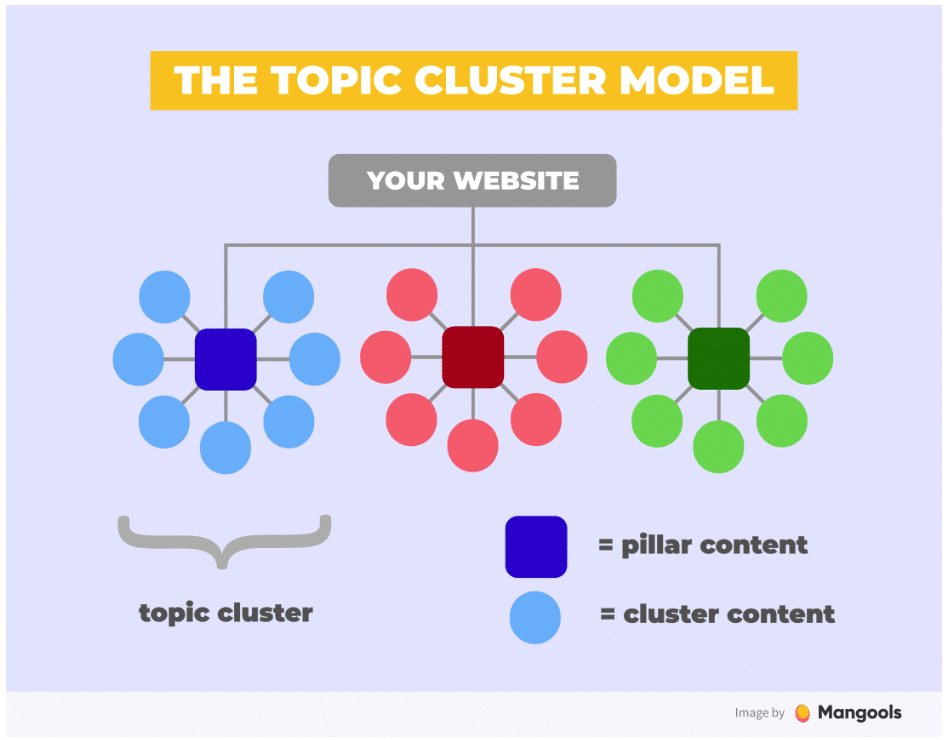
Alt: “Topic cluster map with hub, spokes, and utility pages for topical authority.” -
Priority Score Chart
 Alt: “Priority score comparison by cluster showing demand, difficulty, and business fit.”
Writing Template You Can Reuse (Example Utility Page)
H1: Billable Hours Calculator (Free, Instant)
Intro: Who it helps and how to use it.
H2: How to Calculate Billable Hours (Formula + Example)
H2: Try the Calculator (Interactive + export to CSV)
H2: Common Mistakes (non-billables, rounding, admin time)
H2: Agency Benchmarks (utilization targets)
H2: FAQs (5–7 short answers)
CTA: Save results or start a free trial.
This structure also works for ROI calculators, template pages, and policy generators.
FAQs (Add to Hubs and Comparisons Where Useful)
How do I choose between similar keywords in a cluster?
Check the SERP. If top results are the same, combine into one page and use the secondary keyword as an H2. If SERPs differ, split the topic.
What keyword difficulty should I target?
Blend easy long-tails for quick wins with a few mid-KD hubs for strategic growth. Evaluate KD alongside traffic potential and business fit.
How many pages make a strong cluster?
A practical starter is one hub + five to ten spokes + one utility. Expand later if the SERP shows more distinct intents.
How often should I refresh content?
Run a decay scan every 90 days. Refresh pages that drop ≥20% in impressions, or when the SERP changes format (e.g., new snippet type).
Do I still need backlinks?
Links from relevant sites and useful utilities help clusters perform. Internal linking remains your fastest, safest lever.
Internal Links You Should Add (Navigation & Trust)
-
About: who you serve, why your product exists, and your stance on helpful content → /about
-
Contact: simple form and email; add it to header and footer → /contact
-
Privacy Policy: clear data handling and consent → /privacy-policy
-
Guides Hub / SEO Academy: central index for all playbooks → /academy
-
Key Product Pages: link contextually from relevant posts (e.g., Keyword Explorer, Topic Clusterer, Brief Builder)
Use descriptive anchors. Example: Explore our Keyword Explorer to expand problem-first seeds.
External Links (Trusted Sources Only)
Use a few authoritative links to support claims and help readers dig deeper:
-
Google Search Central — Helpful Content & Intent:
https://developers.google.com/search/docs/fundamentals/creating-helpful-content -
Web Vitals — User-centric performance metrics:
https://web.dev/vitals/ -
Schema.org — Structured data types & examples:
https://schema.org/
Keep external links minimal and relevant. The goal is to educate, then guide users to your internal resources.
Clean Layout & Easy Navigation (Design Notes)
-
Single-column content width: 680–740px for comfortable reading.
-
Readable typography: 16–18px body, 28–36px H1, consistent H2/H3.
-
Table of contents (sticky): anchor links to H2 sections.
-
Generous spacing: short paragraphs and ample white space.
-
Breadcrumbs: clarify location and improve internal linking.
-
Accessible colors: high contrast for links and CTAs.
-
Fast images: compress, lazy-load, and set width/height to stabilize layout.
These choices help Core Web Vitals and keep readers engaged.
7-Day Execution Plan (From Zero to Live Cluster)
Day 1: Define outcomes, ICP, exclusions, and success metrics.
Day 2: Build seeds; expand via autosuggest, PAA, competitor gap, and forums.
Day 3: Clean list; tag intent; add Business Fit.
Day 4: Cluster by meaning + SERP overlap; assign roles (hub, spokes, utilities).
Day 5: Score and prioritize; create briefs for top five pages.
Day 6: Write the hub and two spokes; prepare images and schema.
Day 7: Publish, interlink, push FAQs, and add CTAs. Set up topic tracking.
Repeat for the next cluster. Momentum beats perfection.
Conclusion: Own Topics, Not Just Keywords
The 2025 Keyword Research Playbook is about topic ownership. Start with problems, expand widely, cluster smartly, and publish in sprints. Match intent and SERP formats, support pages with internal links and utilities, and measure by topic. Refresh before decay sets in.
Follow this workflow and you will see steadier growth, stronger conversions, and fewer rewrites.
Popular Tools
Recent Posts
